Getting Started
Creating a New Feature
You can scaffold a mobile feature in two ways:
| Approach | Command | Best for |
|---|---|---|
| Offline starter | pnpm exec nx generate @cdx-extensions/widget-template-mobile:feature | Blank React Native library with no catalog |
| Catalog templates | pnpm exec nx run generate-mobile-feature | DI-backed starters from the extension template catalog |
Both create a correctly structured React Native library wired for @cdx-extensions/di-sdk (PlatformSDK), built with tsup, and aligned with the CDX mobile patterns used in the reference implementations.
The offline generator lives in @cdx-extensions/widget-template-mobile and uses the feature target by design — output is placed under features/mobile/ in the monorepo. You are scaffolding a feature even though the package name includes widget-template.
For catalog-driven generation (category picker, npm template overlays), see Extension Template Catalog. Quick reference:
pnpm exec nx run generate-mobile-feature               # interactive: feature only
pnpm exec nx run generate-mobile-extensions            # interactive: type → category → template → fiId → name
pnpm exec nx run generate-mobile-feature -- --template=agent-chat --fiId=0123 --name=acme-chat
Looking for an embedded home-screen component instead? See Widgets — Getting Started.
The Offline Starter Template
Use the offline starter when you want a blank scaffold without the catalog. The package @cdx-extensions/widget-template-mobile exposes a feature generator for full-screen experiences.
Prerequisites
Before you run the generator, complete the prerequisites and environment setup described in the CDX Extensibility Apps README. That reference repo uses pnpm (corepack enable, then pnpm run setup). Prefix Nx with pnpm exec. If corepack enable fails, see Troubleshooting. For when to use pnpm run vs pnpm exec, see pnpm run vs pnpm exec.
When to Use a Feature
| Generator | Use when | Example |
|---|---|---|
feature | You are building a full-screen experience the host mobile banking app maps to a dedicated bottom tab, or surfaces in the More menu. | 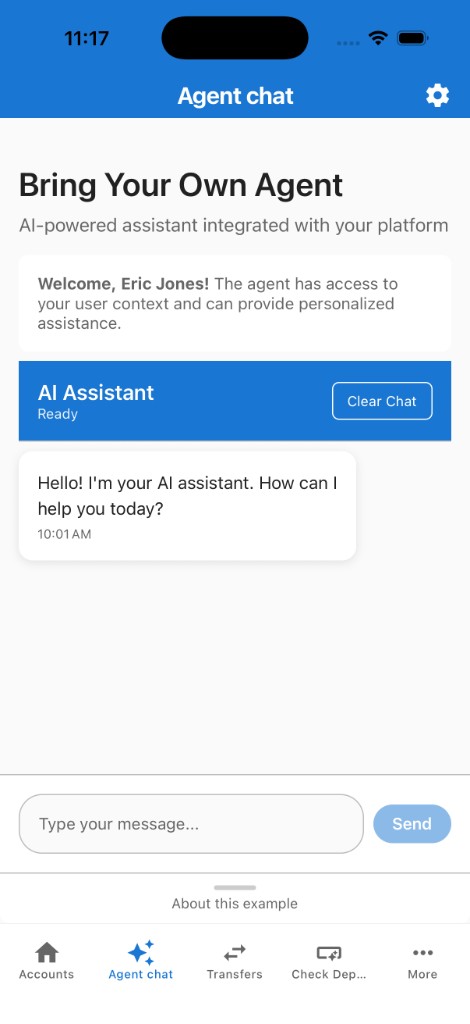 Sample Feature — bottom tab with a full-screen experience |
Command
pnpm exec nx generate @cdx-extensions/widget-template-mobile:feature --fiId=<fi-id> --name=<name>
| Option | Required | Description |
|---|---|---|
--fiId | Yes | Your FI Id (digits only; 4 or 5 digits, e.g. 0123 or 03100). Used as the package scope — the generated package name is @<fiId>-extensions/<name>. Leading zeros on 5-digit IDs are preserved. If Nx drops a leading zero in non-interactive mode, quote the value or pass --fiId=str:03100. |
--name | Yes | Name of the feature (e.g. account-summary). Used as the Nx project name and folder name |
Example
pnpm exec nx generate @cdx-extensions/widget-template-mobile:feature --fiId=0000 --name=my-feature
pnpm exec nx generate @cdx-extensions/widget-template-mobile:feature --fiId=str:03100 --name=my-feature
What Gets Created
Scaffolded under features/mobile/<name>/ by default:
features/mobile/my-feature/
├── src/
│   ├── my-feature.tsx             ← feature component — start here
│   ├── index.ts                   ← named + default exports
│   ├── config.ts                  ← API base URL (baseUrl) and endpoint path (apiPath)
│   └── types/
│       └── branding.ts            ← MobileBrandingTheme types and resolveColors helper
├── package.json
├── project.json
├── tsconfig.json
└── README.md
After You Generate
The generator registers your project in the sandbox automatically. From the repository root:
pnpm run sync:mobile
pnpm exec nx start mobile-sandbox
Press i for the iOS Simulator, a for Android Emulator, or scan the QR code with Expo Go on a physical device. The sandbox provides the mock platform (user context, branding, HTTP client) so your feature can run without the production host app.
Red specifiers in the lockfile don't match then [sync-mobile-sandbox] during catalog generate is expected — wait for the green Nx success. Do not run pnpm run ci:mobile until that sync finishes. See Sandbox lockfile out of sync.
For how features appear in the More menu and full-screen preview, see Mobile Playground — Feature Setup.
What You Can Edit
| File / Folder | Can you edit? | Notes |
|---|---|---|
src/ | Yes, freely | All your UI and business logic goes here |
package.json | Partially | Change name, version, peerDependencies. Keep the build scripts and tsup config as-is |
project.json | Partially | Only change name, outputs, and cwd to match your project folder |
tsconfig*.json | No | Required TypeScript config |
Common Mistakes to Avoid
| Mistake | Why It Breaks |
|---|---|
Using fetch() or Axios directly instead of sdk.getHttpClient() | Bypasses platform auth and security in production |
Importing from @cdx-extensions/di-sdk-mobile in feature code | Only the host app initialises the platform — features import from @cdx-extensions/di-sdk only |
| Adding peer or runtime dependencies outside the versions listed in the CDX Extensibility Apps README | Version conflicts with the host mobile banking app at runtime |
Forgetting to export from src/index.ts | The sandbox (or host app) cannot import your component |
Changing the tsup build scripts in package.json | Breaks the CJS/ESM dual output required for Metro and production bundling |
Next Steps
Mobile feature guides:
- SDK Reference — SDK packages, methods, and usage
- Extension Template Catalog — Scaffold from DI template catalog
- Mobile Playground — Preview features in the banking-style sandbox
- Platform Capabilities (Local) — How local development works with mock data
- Host App Integration — Repository structure and submission process